Posts

Showing posts with the label CCNA

Password Recovery on Cisco router

Password Recovery, In general why some one would go for password recovery. Either user might be forgot his password or change of user. Here are basic requirements before recovering password. We need console connection to the router . Emulation software. Procedure: After restarting the router press some keys on the keyboard on pc operating system which connected to router via console port. Special keys are different for different Operating system.                             Window Operating system:- Ctrl + Pause Break , Linux Ctrl+a, f. After press keys we are allowed to default mode of router where we have to set the register value as 0x2142. But this value option is again different for different router. Fixed Router > o/r 0x2142 and >i(restarting) Modular Router : rommon1>confreg 0x2142  and rommon2>reset. After entering into router, we should copy the information from NVRAM  ...
VIRTUAL LOCAL AREA NETWORK(VLAN)

VIRTUAL LOCAL AREA NETWORK(VLAN) A VLAN is a logical grouping of network users and resources connected to administratively defined ports on switch. When you create  VLANS, you're given the ability to create smaller broadcast domain within a layer2 switched inter-network by assigning different ports on the switch to different sub networks. A VLAN is treated like its own subnet or broadcast domain. By default, hosts in a specific VLAN cannot communicate with hosts that are members of another VLAN, so even inter communication among different VLANs is also possible by creating trunk port on switch and sub-interfaces on routers. If you create VLAN many network related problems in Layer 2 can be solved. Here's short list of ways VLANs simplify network management.  Network adds, moves, and changes are achieved with ease by just configuring aport into the appropriate VLAN. A group of users that need an unusually high level of security can be put into its own VLAN so t...

Access Control List(ACL)

Image
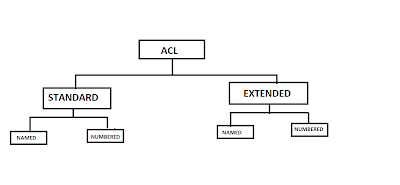
Access Control List Earliest Method of providing network security. It provides layer 3 and layer 4 security. Controls the flow of traffic from one network to another. Filter packets (packet filtering firewall) Terminologies Deny: blocking a network/Subnet/Host/Service Permit: Allowing a network/Subnet/Host/Service Source Address: The address from where the request starts. Destination Address: The address where the request sends. Inbound: Traffic coming into the interface Outbound: Traffic going out of the interface Protocols:   IP(Internet Protocol) TCP (Transmission Control Protcol) UDP (User Datagram Protocol) ICMP (Internet Control Messaging Protocol)       8.Operators: eq(equal to) neq(not equal to) lt(less than) gt(greater than)        9.Services: HTTP(80),FTP(20,21),TELNET(23),DNS(53),DHCP( 67,68) Wildcard Mask Tells the router which addressing bits must match to the address ...

EIGRP Routing protocol

EIGRP(Enhanced Interior Gateway Routing Protocol) Advanced Distance vector protocol Earlier Cisco proprietary- But now it has become open standard, this might be the one of the reason most of the routers are configured with OSPF protocols. Uses Dual (Diffusion Update Algorithm) Best path and second best path. Classless routing protocol Updates are sent through multicast IP address 224.0.0.10 Incremental updates -sends only partial change or update in the data instead of sending entire protocol. Administrative distance is 90 Metric(32-bit): Composite metric Bandwidth, delay, load, reliability and MTU Bandwidth and delay is used by default Maximum hop count supported is 224(default is 100) Hello packets are sent every 5 secs Supports IP, IPX and Apple Talk protocols Support 4 path load balancing (maximum 16 equal or unequal paths) Convergence rate is fastest Dead timer is 15 sec   EIGRP Tables: Neighbor Table: Contains information about directly conn...

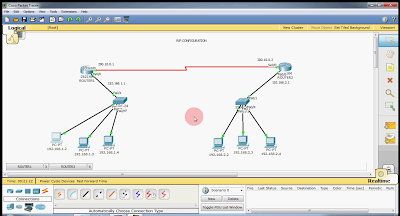
OSPF(Open Shortest Path First) Routing protocol configuration on Packet Tracer

OSPF Link State Protocol Open Standard Successor of RIP Uses Dijkstra(shortest Path first(SPF) algorithm) Classless routing protocol Updates are sent through multicast IP address 224.0.0.5 Triggered updates & periodic updates Hello packets are sent every 10 secs Dead time is 40 secs Administrative distance is 110 Metric= cost =10^8/ Bandwidth in bps(CISCO) Unlimited hop count Faster Convergence Hierarchical design with multiple areas One area has to be designated as Area 0 Area 0(zero) is called the backbone area Neighbor  Routers that share a common link become neighbors Neighbors are discovered by hello packets To become neighbors the following should match Area ID Hello and dead intervals Authentication Adjacency Adjacencies are formed once neighbor relation is established In Adjacencies the database details are exchanged OSPF TABLES Neighbor Table :  It contains directly connected routers information Databa...

Frame Relay configuration of Cisco router in Packet tracer

FRAME RELAY Frame Relay is intended to provide long distance or non-persistent connections . Frame Relay abolishes the Network Layer of the OSI model, claims the routing and multiplexing functions for itself, and leaves everything else to the higher layers. A Frame Relay service ignores traditional functions such as window rotation, sequence numbering, frame acknowledgment, and automatic retransmission in order to concentrate on the basics: delivering correct data quickly in the right order to the right place. It simply discards incorrect data. The need for a streamlined protocol like Frame Relay grows from several facts of modern data communications: Users have more data to communicate, and they'd like that data to travel faster and in larger chunks than current technology has allowed. Physical transmission gets faster every year and introduces fewer and fewer errors into the data. Computers and workstations with the intelligence to handle high-level protocols have r...

Backup and Restore Router configuration using packet tracer

Backup plays a important role in many organizations as on today scenario. What is backup? It is a copy of original source -maintained in case of disaster. Restore comes into the concept unless you have a backup copy of source. Here I am going to show you in the below video how Cisco router are restored after backup using TFTP server.

NAT & PAT configuration on Cisco Packet tracer

Image
Network Address Translation(NAT) :    NAT is a process of changing one IP into another.  NAT is used to save Public IP.  It provides security.  In other words NAT converts request from Private IP address to Public IP address and vice-verse. It helps in hiding the Private IP address of an organization by representing Public IP address as a source/destination. Types of NAT STATIC NAT(one-one mapping) DYNAMIC NAT(many-many mapping) PAT(many-one mapping) STATIC NAT: One Private IP address is mapped to one Public IP address. Generally used for hosting public servers. Configured for inbound traffic. STEPS FOR CONFIGURING STATIC NAT IN CISCO ROUTER: ISPRouter(config)#interface serial 0/0 ISPRouter(config-if)#ip address 11.0.0.2 255.0.0.0 ISPRouter(config-if)#no shutdown ISPRouter(config-if)#encapsulation ppp ISPRouter(config-if)#clock rate 64000 ISPRouter(config-if)#exit ISPRouter(config)#interface fast Ethernet 0/0 ISPRouter(co...

ROUTING PROTOCOLS

Image
Routing is the process of moving packets from one network to another network.  Routing involves two basic activities- a)Determining best paths  b)Forwarding packets through these paths. Conditions of routing :- 1)Router1 ethernet  interface should be in the same network as your Router1 office LAN and similarly is the case with Router2 and its LAN. 2)Router1 and Router2 connected serial interface should be in the same network i.e., ip address 3)Router1 LAN and Router2 LAN should be in different networks. 4)All interfaces of a routers should be in different networks. Types of Routing 1)Static Routing 2)Default Routing 3)Dynamic Routing But we are going see Dynamic Routing first. Dynamic Routing :- Each router in dynamic routing, advertise to their neighbor router. For updating information, each router will have time outs based on routing protocol. RIP(ROUTING INFORMATION PROTOCOL) :- Distance vector protocol Open Standard Uses Bellman-Ford a...

Change port numbers for POP3 and IMAP4 using Exchange Server 2007

HOW TO CHANGE PORTS FOR POP3 & IMAP4 USING EXCHANGE SERVER 2007 In order to change the port number for POP3 and IMAP4. Go to Exchange server pc, then go to EMC(Exchange Management Console) Click on Expand " Server Configuration "   Click on " Client Access" , Select IMAP4 right click --> Properties--> select " Binding" tab   then Click on Add   under TLS(HTTP)-->type the port no xxxx Similarly mention the port no for SSL(HTTPS) connection and POP3 TLS&SSL port nos.